Wireless Printing with PaperCut Mobility Print
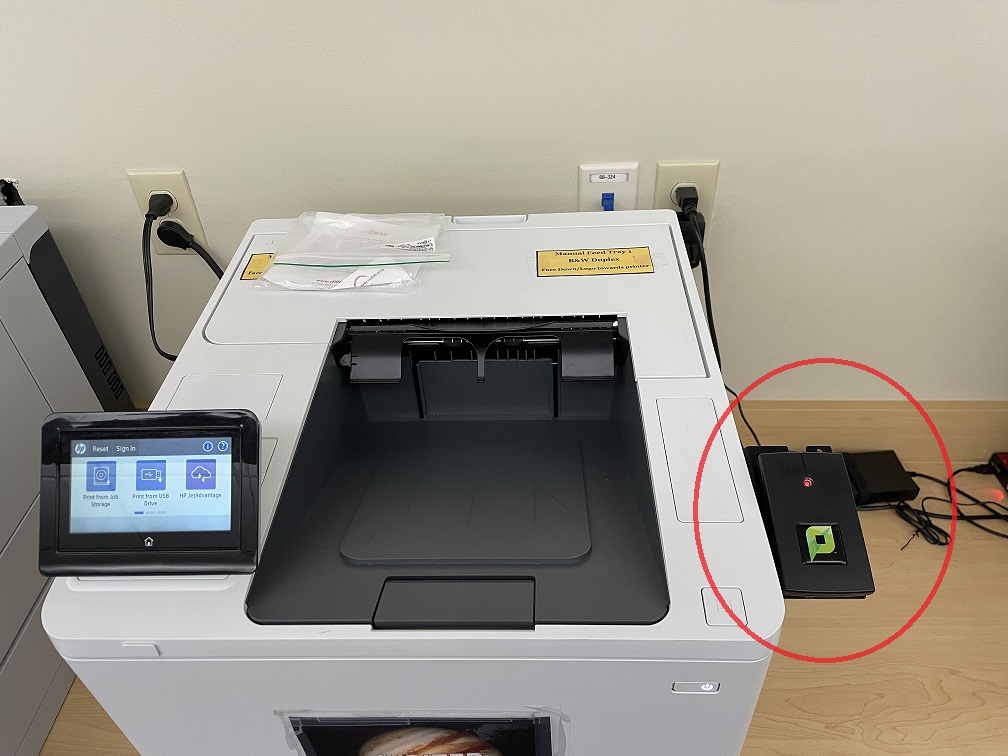
Wireless printing is available in TechCentral, Student Center, and Library. You may print directly from your mobile device to the PaperCut pay-for-print system, and release the print job using the card reader on the printer.
To set up wireless printing on your device (one-time set up, while on campus):
- Open a web browser on your device and go to https://print.ccsu.edu.
- The system will automatically detect the type of devices (Windows, Mac, iOS, Android). If it didn't detect correctly, click the icon for your device at the bottom of the screen (Note: on an iPad, you may have to type https://print.ccsu.edu/ipad).

- Follow the on-screen instructions to set up PaperCut Mobility Print on your device. This will set up your device to print the HP-Find-Me print queue so that you may release your print job on a campus PaperCut printer with your Blue Chip ID card. See below for detailed information about each type of device.
To print from a mobile device on campus:
- Access the Print option on your device.
- Ensure the printer defaulted to HP-Find-Me.
- Configure the print settings (number of copies, single or double-sided, color or black & white) then press Print.
- Go to a PaperCut printer in TechCentral, Student Center or Library and tap your Blue Chip card on the card reader to release your print job. Please note, you must have money on your Blue Chip ID card in order to print (you may check your balance at https://get.cbord.com/ccsu.)
Windows One-Time Configuration
- Open a web browser on your device and go to https://print.ccsu.edu.
- The system will automatically detect that you are on a Windows computer. If it didn't detect correctly, click the Windows icon at the bottom of the screen.
- Click the Download button to download the PaperCut Mobility Print installer.
- Run the PaperCut Mobility Print installer on your device. This will set up your device to print to the HP-Find-Me print queue so that you may release your print job on a campus PaperCut printer with your Blue Chip ID card.
Mac One-Time Configuration
- Open a web browser on your device and go to https://print.ccsu.edu.
- The system will automatically detect that you are on a Mac computer. If it didn't detect correctly, click the Apple icon at the bottom of the screen.

- Click the Download button to download the PaperCut Mobility Print installer.
- Run the PaperCut Mobility Print installer on your device. This will set up your device to print to the HP-Find-Me print queue so that you may release your print job on a campus PaperCut printer with your Blue Chip ID card.
- If you are prompted to enter your name and password for "find me" as shown, enter your CCSU email address and password then click OK.
iPhone or iPad One-Time Configuration
- Open a web browser on your device and go to https://print.ccsu.edu.
- The system will automatically detect that you are on an iPhone or iPad (Note: on an iPad, you may have to type https://print.ccsu.edu/ipad). If it didn't detect correctly, click the iOS icon at the bottom of the screen.

- Click the Download button to download the PaperCut Mobility Print profile.
- Either tap Profile Downloaded/Install or go to General/Profile/PaperCut Mobility Print for iOS/Install to install the profile on your device. This will set up your device to print to the HP-Find-Me print queue so that you may release your print job on a campus PaperCut printer with your Blue Chip ID card.
Android One-Time Configuration
- Open a web browser on your device and go to https://print.ccsu.edu.
- The system will automatically detect that you are on an Android. If it didn't detect correctly, click the Android icon at the bottom of the screen.

- Click the Install or Update button to install or update the PaperCut Mobility Print app on your device.
- If you see the Open with Mobility Print screen shown, click Always. This will set up your device to print to the HP-Find-Me print queue so that you may release your print job on a campus PaperCut printer with your Blue Chip ID card.
Need Help?
If you have any questions or need assistance, please contact the IT Help Desk at 860-832-1720 or email techsupport@ccsu.edu.

